Common Issues & Fixes
Step-by-Step Instructions
1. Connect to Your Printer
- On Windows, open Command Prompt
- Type: ssh biqu@PRINTER-IP (replace PRINTER-IP with your actual printer IP address)
- Press ENTER
- When prompted for a password, type: biqu
- Press ENTER
2. Open the Configuration File
- Type: sudo nano ./klipper/klippy/mcu.py
- Press ENTER to open the text editor
3. Find and Edit the Timeout Value
- Use the Down Arrow key to scroll down
- Find the line: TRSYNC_TIMEOUT = 0.025
- Change it to: TRSYNC_TIMEOUT = 0.050
4. Save Your Changes
- Press CTRL + X
- Press Y
- Press ENTER
5. Reboot the Printer
- Type: sudo reboot now
- Press ENTER
- The printer will reboot automatically
Result
The error should be resolved after the reboot completes.
Credit
Thanks to @__esm__ on Discord for this solution!
⚠️ Update
This will create a "Repo is dirty." warning in the Machine tab, ignore this.
You might have to re-do this if you update klipper.
What Went Wrong
When updating Klipper and compiling new RP2040 firmware for the BTT DZ01 using the newest Klipper source code, it can sometimes result in a broken build. The chip loses its ability to toggle the physical enable pins for the TMC2209 stepper drivers. Klipper will connect successfully, but the motors will completely refuse to move.
The Common Trap
Because the BTT DZ01 is an all-in-one board, users mistakenly assume the motor enable pins are wired to the Allwinner H616 (the Linux host). Believing the H616 is the problem, they put the host into bootloader mode and attempt to flash it. Do not do this. Flashing the H616 will corrupt the operating system, break the GPIO drivers, and cause a new set of problems. The motor failure is strictly an RP2040 firmware issue.
How to Fix It
To solve this, you need to bypass compiling the firmware yourself and flash a "known-good" backup of the RP2040 firmware.
Prerequisites
- Download the known-good rp2040_firmware_backup.uf2 file from the GitHub repository: Download Here
- If you already attempted to flash the H616 processor and broke your operating system, you must flash a fresh BigTreeTech CB1 OS image to your SD card before proceeding.
1. Put the RP2040 into BOOTSEL Mode
To flash the RP2040, you must put it into BOOTSEL mode while keeping the Linux host running.
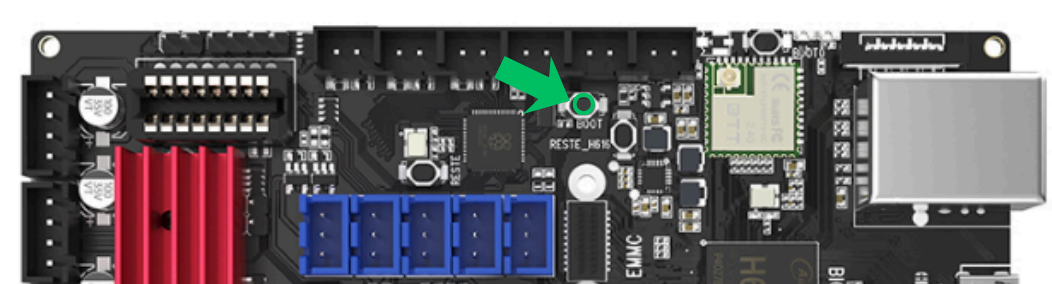
- Turn off the main power to your printer.
- Locate the BOOT button (highlighted in green in the image above).
- Press and hold the BOOT button, then turn the printer power back on while continuing to hold it for about 3 seconds, then release.
- Wait a minute for the Linux host to fully boot up, and SSH into your machine.
2. Mount the RP2040
- Because the RP2040 is in BOOTSEL mode, it will show up to the Linux host as a USB storage drive.
- Type: sudo mkdir -p /mnt/pico and press ENTER.
- Type: sudo mount /dev/sda1 /mnt/pico and press ENTER. (Note: Depending on your Linux setup, the device might be sdb1 or sdc1. You can run lsblk to verify).
3. Flash the Known-Good Firmware
- Move the .uf2 file you downloaded onto your Linux host (via SFTP, or by dropping it in your Klipper config folder via the web interface).
- Type: sudo cp path/to/your/rp2040_firmware_backup.uf2 /mnt/pico/ and press ENTER.
- (Be sure to replace "path/to/your/" with the actual location where you saved the file).
4. Reboot
- Once the file finishes copying, the RP2040 will automatically reboot, disconnect the storage drive, and load the fresh Klipper firmware.
- Power cycle your printer one last time, and your stepper motors should now enable and function normally!
Credit
Thanks to @keep3dp and @scopeuk on Discord for helping track down this solution!
Return to Delta Flyer Refit
Ready to explore more resources and configuration files?
← Back to Setup Guide